ARCHITECTURE
Goal:
The goal of the extension is to be able to validate the HTML of the page seen in the browser, check for syntax errors.Design Choices:
(a) The validation is done in the browser since it is there that the HTML is. It is only there for dynamic pages.(b) The HTML should be the one sent by the browser (only Chrome can do it today, it was possible in FF before version 48)
(c) It should happen offline (in the browser for security, confidential reason)
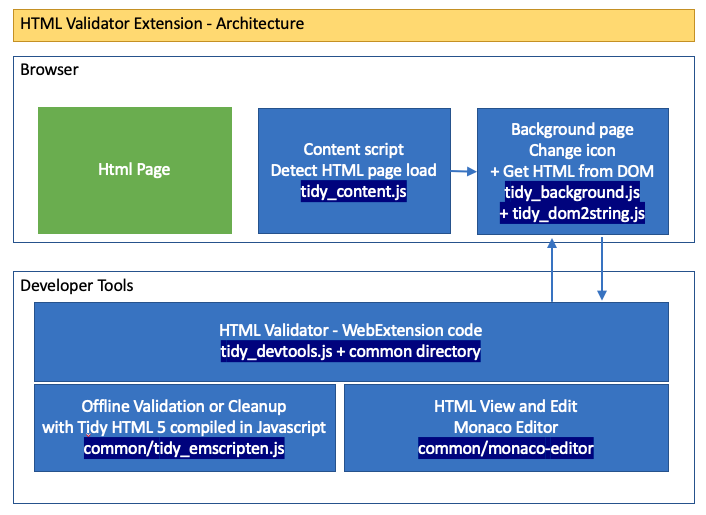
Difference between Chrome and Firefox
There are 2/3 places in the code where the behavior of Firefox and Chrome differs.Mostly Firefox has not implemented some WebExtension API, and is not able to get the HTML sent by the browser.
Firefox is limited to read the HTML from the DOM of the page. See here.
Main Components
- HTML Tidy 5: https://www.html-tidy.org/
This is a C program that is compiled on Linux in the same way than with GCC. Except that it is done with Emscripten. Instead of getting a tidy.lib file. It creates a "tidy_emscripten.js" file that allow to validate the HTML offline. - Monaco editor to view the HTML page: https://microsoft.github.io/monaco-editor/
This is not an ideal choice (too big, but this is the only good way that I found) - WebExtension code to get the HTML from the current tab, Validate or cleanup the HTML via (1) and show the result via (2)
HOW TO COMPILE FROM SOURCE
See git: https://github.com/mgueury/html_validator/
How to build ?
There are 2 levels of build
- Rebundle the extension based on the source provided above and run in the browser.
- Regenerate the code of (1) and (2)
- For the Monaco Editor. It is simply by downloading the monaco zip file from github. The monaco editor is the version 0.24. Only the minify version is the git repository: https://github.com/microsoft/monaco-editor/archive/refs/tags/v0.24.0.zip
- For "tidy_emscripten.js", it is by recompiling Tidy HTML with emscripten on Linux. Practically, you need to install emscripten on a Linux machine and some knowledge on how to compile a C program on Linux. The file tidy_build_js.tgz contains the source code to do it.
PERMISSION
- "<all_urls>"
Needed To be able to validate any page on internet - API: "clipboardWrite"
Needed To be able to copy the HTML of the cleanup page to the clipboard - API: "storage"
I do not use storage API. But when not there the extension does not work and seems to have issue to find some global variables. - API: webnavigation:
API used : chrome.webNavigation.getAllFrames
Needed to get the list of Frames to be able to select them:
Needed to find the frameId of a URL and get the HTML of the page from the DOM (HTML after Javascript) - Content script
Needed to detect when the browser navigate to another page to refresh the HTML validator
File : tidy_content.js (about 10 lines big)
INSTALLATION IN THE BROWSER
Firefox
To install the extension on Firefox:- in the URL: type about:debugging
- then "Load Temporary Add-on"
- choose any file in the <html_validator> directory. Ex: <html_validator>/manifest.json
- the extension should be loaded.
For more info, see https://developer.mozilla.org/en-US/Add-ons/WebExtensions
Chrome
To install the extension on Chrome- in the URL: type chrome:extensions
- enable "the developer mode"
- then "Load Unpacked Extension..."
- choose any file in the <html_validator> directory. Ex: <html_validator>/manifest.json
- the extension should be loaded.
For more info, see https://developer.chrome.com/extensions/getstarted